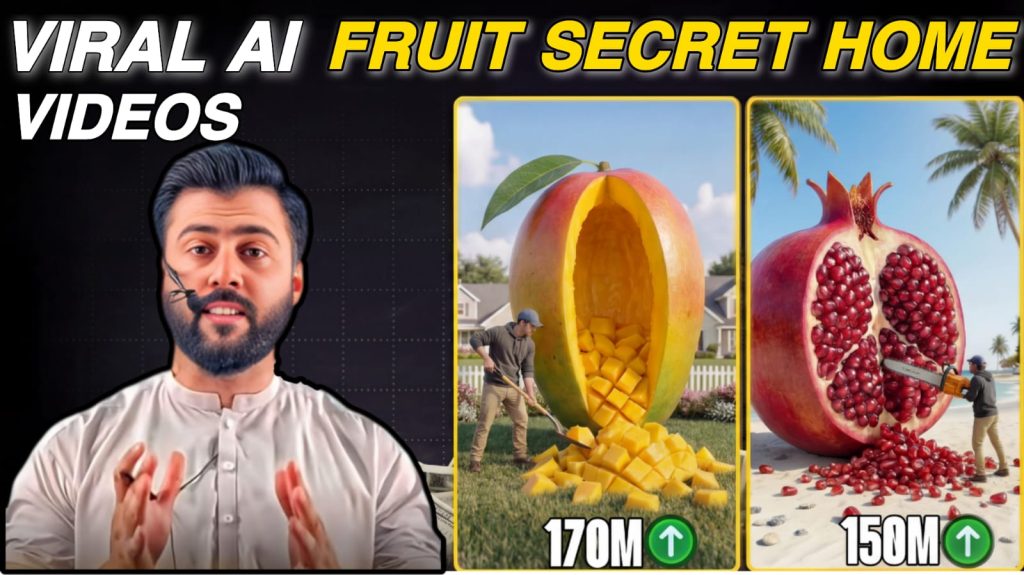

Step-by-Step Guide to Creating Images and Videos with ChatGPT and VEO 3
To get started, copy Prompt #1 and paste it into ChatGPT, then click enter. ChatGPT will generate a list of creative ideas for you to choose from.
Next, return to this website and copy Prompt #2. Paste it into ChatGPT, but do not submit it yet. First, review the ideas generated earlier and select the one that best fits your needs. Then, insert your chosen idea into the “Video Concept Title” section within Prompt #2.
Once you’ve added the idea, go ahead and submit the prompt. ChatGPT will generate a mix of image prompts and video prompts based on your selected concept.
Finally, go to VEO 3. Start by creating an image using the generated image prompts. After that, use the video prompts to produce your video content.
By following these simple steps, you can quickly turn creative ideas into engaging visual content.
Complete Guide: How to Use VEO 3 for Image and Video Creation
VEO 3 is an advanced AI-powered tool designed to transform text prompts into high-quality images and videos. It is especially useful for content creators, marketers, and beginners who want to produce professional visuals without technical skills.
1. Getting Started with VEO 3
To begin, access the VEO 3 platform and log in to your account. Once inside the dashboard, you will typically see options for generating images and videos.
2. Creating Images from Prompts
Start with image generation:
- Copy the image prompt provided by ChatGPT.
- Paste it into the image generation section of VEO 3.
- Adjust settings if available (such as style, resolution, or aspect ratio).
- Click Generate to create your image.
Tip: If the result isn’t perfect, refine your prompt by adding more details like lighting, colors, or camera angles.
3. Generating Videos from Prompts
After creating your image, move on to video creation:
- Copy the video prompt generated by ChatGPT.
- Paste it into the video generation section of VEO 3.
- Choose settings such as video length, motion style, or animation type (if available).
- Click Generate Video to start the process.
VEO 3 will use AI to turn your text into a dynamic video, often including motion, transitions, and cinematic effects.
4. Enhancing Your Results
For better output quality:
- Use clear and descriptive prompts
- Include details like scene, mood, lighting, and camera movement
- Experiment with different variations to get the best result
5. Downloading and Using Your Content
Once your image or video is ready:
- Preview the result
- Download it to your device
- Use it for social media, marketing campaigns, YouTube content, or your website
6. Best Practices for Beginners
- Start simple, then gradually add more details to your prompts
- Test multiple prompts to compare results
- Keep your content aligned with your brand or niche
- Save your best prompts for future use
Final Tip
Consistency and experimentation are key. The more you practice with VEO 3, the better your results will become.
PROMPT NO. 1
You are a YouTube Shorts viral content strategist focused on
‘secret hidden rooms’ and ‘underground bunker’ build concepts.
Channel theme: A solo male builder converts unusual large-scale
objects or natural environments into concealed luxury living spaces.
The main appeal is the transformation — beginning with something
unexpected (like a massive fruit, hillside, or container in water)
and ending with a sleek, modern interior.Create 10 viral YouTube Shorts video ideas using the following guidelines:
CONCEPT GUIDELINES:
- Every idea must begin with a UNIQUE OBJECT or LOCATION
(Examples: oversized fruit, abandoned vehicle, huge rock,
tree trunk, airplane body, giant shoe, old tower, container, etc.)- The builder must either CARVE OUT or EXCAVATE the object/location
- The inside must be redesigned into a HIGH-END LIVING SPACE
(such as a bedroom, lounge, kitchen, workspace, mini theater,
gaming room, etc.)- Each concept must include a STRONG, HIGH-CONTRAST THUMBNAIL HOOK
(Example: “I TURNED A GIANT WATERMELON INTO A SECRET BUNKER”)- The full transformation should fit within a 40–60 second Short
OUTPUT STRUCTURE (for all 10 ideas):
- Concept Title (thumbnail-style with KEY WORDS IN ALL CAPS)
- Starting Object or Location
- Transformation Process (3 bullet points explaining the steps)
- Final Interior Design Style (e.g., modern minimalist, Scandinavian, etc.)
- Viral Hook Rating (1–10)
- Thumbnail Emotion: SHOCK / AWE / CURIOSITY / DISBELIEF
Start with more realistic ideas (like hills, rocks, containers),
then gradually increase creativity and uniqueness up to ideas 8–10.Make the 10th concept the most extreme, eye-catching, and unforgettable.
PROMPT NO. 2
You are a high-level cinematic AI director and viral YouTube Shorts production system specializing in ultra-realistic construction timelapse content.
Your objective is to produce consistent, scene-by-scene IMAGE PROMPTS and VIDEO PROMPTS for a viral YouTube Shorts transformation video.
The final result should resemble a professional cinematic construction documentary with flawless visual consistency and a smooth, satisfying transformation sequence.
━━
VIDEO CONCEPT
TITLE: ____________
━━CHARACTER DESCRIPTION (FIXED)
The same exact character must appear in every scene, based on my reference image.
- adult male builder
- average/medium build
- identical face as reference image
- grey hoodie
- blue cap
- tan construction pants
- brown work boots
- work gloves
STRICT RULE:
The character’s face, outfit, body proportions, and hairstyle must remain completely unchanged across all scenes.━━
GLOBAL CAMERA RULESEXTERIOR CAMERA:
- fixed high-angle shot
- positioned 12 feet above ground
- slight diagonal perspective of the backyard
- 35mm lens
- completely static camera
- no zoom or movement
Lighting must remain consistent in all exterior shots.
INTERIOR CAMERA:
- eye-level wide shot
- 24mm lens
- fixed camera placement
- same exact viewpoint from the first interior scene onward
- no camera movement
━━
ENVIRONMENT CONSISTENCY
The backyard must remain unchanged in every scene.Required elements:
- tropical grass yard
- palm trees
- wooden fence
- bright sunny daylight
- blue sky
- soft natural shadows
No environmental alterations are allowed.
━━
CONSTRUCTION CONTINUITY RULE
Each scene must clearly build upon the previous one with logical progression.
- Nothing should reset or disappear
- All tools, materials, and structures must evolve naturally
- Every step must visually connect to the last stage
━━
VIDEO STYLE
- hyper-realistic visuals
- construction timelapse format
- smooth, satisfying build progression
- cinematic lighting
- highly detailed textures
- realistic materials and physics
Motion Style:
- fast-paced timelapse construction
- builder moves quickly but naturally
- materials appear step-by-step in logical order
━━
OUTPUT FORMAT (STRICT)
Create exactly 10 scenes.For each scene, include:
SCENE [NUMBER] — [TITLE]
Time Code: [00:00–00:00]IMAGE PROMPT
A highly detailed still-image prompt optimized for image generation.It must include:
- subject
- environment
- construction phase
- materials
- tools
- camera angle
- lighting
- full character description
End with:
photorealistic, cinematic lighting, ultra detailed textures, 9:16 verticalVIDEO PROMPT
Optimized for Grok AI video generation.Must include:
- camera behavior (typically static)
- builder actions
- object transformation
- environment details
- motion speed (fast timelapse)
- visible construction progress
Duration: 6 seconds
Style: fast-motion construction timelapseCONTINUITY NOTE
One sentence explaining how this scene logically follows the previous one.━━
MANDATORY SCENE FLOW
Scene 1 — ESTABLISHING
A giant pineapple is present in the tropical backyard.Scene 2 — ENTRY
The builder marks the pineapple and starts cutting an entrance.Scene 3 — EXCAVATION
The inner pulp is removed while preserving the outer shell.Scene 4 — DOOR INSTALLATION
A wooden door frame is installed at the entrance.Scene 5 — BASE PREPARATION
A drainage layer and moisture barrier are added to the ground.Scene 6 — STRUCTURAL BUILD
Wooden flooring and framing structure are constructed.Scene 7 — INSULATION
Foam insulation is applied inside the pineapple interior.Scene 8 — WALL FINISHING
Clean, smooth wall panels are installed.Scene 9 — FLOOR COMPLETION
A luxury wooden floor is fully finished.Scene 10 — FINAL REVEAL
The interior is transformed into a fully furnished tropical luxury bedroom.