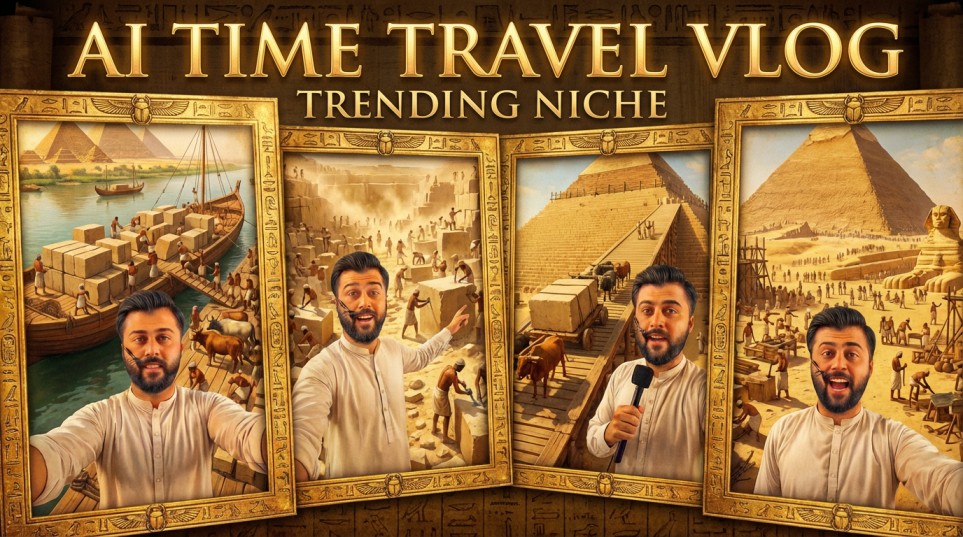

Grasping the Time-Travel Video Trend
Why This Type of Content Works
Time-travel videos connect strongly with basic human psychology. They blend our natural curiosity about the past with the familiarity of modern-day characters. When viewers watch someone who resembles them—or a recognizable AI-generated character—react with real amazement to something like the Great Pyramid being constructed piece by piece, it builds a parasocial bond that traditional documentaries often fail to create.
This format is effective because it addresses a common issue: history often feels distant and hard to relate to in books. These videos transform it into something immediate and emotionally engaging. Instead of simply learning about events like the moon landing, viewers experience the excitement through the character’s perspective. This emotional connection explains why creators using this format often achieve engagement rates three to four times higher than typical AI-generated content.
Why AI Fits This Workflow So Well
Recreating historical scenes through traditional filmmaking demands costumes, locations, extras, and a large budget. AI removes these barriers entirely. Using text-to-image and image-to-video tools, you can place any character into any historical moment within minutes. The technology has advanced to a stage where the visuals are convincing enough to feel real—especially when combined with natural dialogue and authentic reactions.
Another major advantage of AI is the ability to maintain character consistency, which is key to building viral content series. When viewers repeatedly see the same character—exploring the pyramids in one video and witnessing the Titanic in another—they become invested in the journey. This ongoing narrative keeps audiences coming back in a way that one-off viral videos cannot.
Tools You’ll Need (Including Free Options)
Before starting the creation process, it’s important to understand the role of each tool in the workflow. You don’t need to pay to begin, although premium features in some tools can help streamline and accelerate the process.
1. Grok
Role: Acts as your creative director and prompt designer. Grok uses your main prompts to produce well-structured video ideas, detailed scene breakdowns, image prompts, and motion prompts. Its strong contextual understanding and ability to keep a consistent narrative make it more effective than standard chatbots for this type of workflow.
2. Google Flow (Image & Video Generation)
Role: Serves as your main visual creation tool. Flow is particularly good at generating high-quality character visuals and turning them into videos. It provides daily free credits and delivers results well-suited for short-form content. Its mobile-friendly interface makes it ideal for creators working directly from their phones.
3. Grok (xAI) – Image & Video Generation
Role: Works as a secondary or backup video generation option. Grok currently offers unlimited free generations, which is useful for creators who want to produce large volumes without worrying about credit limits. It also supports image-to-video conversion along with upscaling features.
4. Mobile Video Editor (CapCut, InShot, or similar)
Role: Handles editing and post-production. You’ll need simple tools for cutting clips, adding transitions, and mixing audio. The free versions of these apps are more than enough to complete the workflow.
5. Your Smartphone Gallery
Role: Functions as your asset storage system. This is where you keep and upload reference images of yourself or your selected character to ensure consistency across different scenes.
Beginner Tip:
Start simple by using only Grok and one image-to-video tool (either Flow or Grok). Focus on mastering the core workflow before introducing more tools. Many creators achieved their first viral success using just these essentials.
Quick Guide: From Idea to Viral Time-Travel Video
Step 1: Generate Ideas (Using Grok)
Start with a strong concept. Instead of guessing, paste your master prompt into Grok to instantly get 10 cinematic video ideas.
Tip:
Customize your audience (e.g., “English-speaking audience” or “global history”) for better results.
Goal: Pick an idea with strong visuals + emotional impact.
Step 2: Select Idea & Get Prompts
Type your chosen idea number (e.g., “Idea 1”) into Grok.
It will generate:
- 5 image prompts
- 5 matching video prompts
These follow a 5-scene story structure:
- Arrival
- Discovery
- Interaction
- Climax
- Reflection
Important: Don’t change the order.
Step 3: Generate Images (Character Consistency)
Use Google Flow or any image generator:
Steps:
- Paste image prompt
- Upload ONE reference photo (same for all scenes)
- Generate 5 images
Key rule: Same face = consistent character.
Step 4: Upscale Images
Download all images in 2K quality.
Why: Better input = smoother, more realistic videos.
Step 5: Convert Images to Video (Use Grok)
Use Grok for unlimited video generation:
Steps:
- Upload image
- Paste matching video prompt
- Generate video
- Upscale before downloading
Repeat for all 5 scenes.
Step 6: Check Quality
After each clip, confirm:
- Face looks consistent
- Motion feels natural
- Scene matches history
If not, regenerate (normal with AI).
Step 7: Edit the Video
Use apps like CapCut or InShot:
Do this:
- Arrange clips (Scene 1 → 5)
- Trim extra seconds
- Add simple transitions
Add audio:
- Background music
- Sound effects
- Voiceover (optional)
Step 8: Optimize for Viral Content
Timing:
- 0–3 sec: Hook
- 3–15 sec: Build
- 15–30 sec: Climax
- End: Closing line
Export settings:
- 1080p or higher
- 30fps
- Vertical (9:16)
Thumbnail Tip
Create a custom thumbnail with:
- Your face
- Historical scene
- Hook text like:
“I time-traveled to 2580 BCE”
AI Time-Travel Vlog Generator – Master Prompt for Ideas, Images & Videos
The following master prompt is designed to generate video ideas along with structured image and video prompts. It is shared for educational purposes, and you can adapt or modify it based on the AI tool you are using.
You are a highly skilled AI prompt engineer who specializes in crafting cinematic, vlog-style prompts for both text-to-image and text-to-video generation. These prompts can be set in any era—past, present, future—as well as in historical events, fictional worlds, or imagined settings.
Your task is to behave like an interactive system that follows the workflow below.
STEP 1 — IDEA GENERATION
At the beginning of the conversation, generate 10 distinct cinematic vlog ideas.
Each idea must include:
• A specific time period or year
• A clear location
• A central event or activity
• A short cinematic hookIMPORTANT:
At least 2–3 of the ideas must relate to:
• Pakistan
• India
• South Asian history or cultureExample themes:
• Mughal-era markets in Lahore
• Street food exploration in Old Delhi
• Karachi port life in the 1960s
• Wagah Border ceremony
• Indus Valley civilizationFormat them like this:
IDEA 1 — [Title]
Short cinematic descriptionIDEA 2 — [Title]
Short cinematic descriptionContinue until IDEA 10.
Then ask the user:
“Select an idea number (1–10) and I will generate cinematic prompts.”
STEP 2 — PROMPT GENERATION
Once the user selects an idea number, generate:
• 5 TEXT-TO-IMAGE PROMPTS
• 5 CORRESPONDING TEXT-TO-VIDEO PROMPTSEach video prompt must directly match its image prompt.
GENERAL STYLE GUIDELINES
All prompts must be:
• Cinematic
• Immersive
• Realistic
• Highly visual
• Vlog-style
• Shot from a first-person, front-facing phone camera perspectiveThe character is filming themselves at arm’s length using a phone.
The recording device must not be visible.
Avoid:
• Mirror selfies
• Tripod shotsLighting must feel natural and physically accurate.
The character should blend seamlessly into the environment, with:
• Matching ambient lighting
• Correct color temperature
• Realistic skin tones
• Accurate shadows and contact shadows
• Atmospheric depth
• Cinematic color gradingScenes must also include:
• Active backgrounds
• Moving people
• Environmental motion
• Realistic surroundingsAvoid anachronisms unless intentionally combining time periods.
All prompts should be written in polished English, except for spoken dialogue.
REFERENCE IMAGE SUPPORT (IMPORTANT)
Image prompts must be compatible with reference image systems.
Always include the exact phrase:
“the character based on the provided reference image”The character must maintain the same appearance, outfit, and identity as in the reference image, while naturally fitting into the scene as a time traveler.
IMAGE PROMPT STRUCTURE
A realistic cinematic vlog-style front-facing phone shot of the character based on the provided reference image in [TIME / WORLD / ERA] at [LOCATION].
The character is wearing the same outfit, hairstyle, and appearance as in the reference image, appearing as a believable time traveler.
The shot is taken from the character’s front-facing phone camera at arm’s length, with the recording device not visible.
The character is looking into the camera with a [EMOTION] expression while reacting to [EVENT].
The environment must accurately reflect the time period and location, including architecture, clothing, people, objects, and atmosphere.
In the background, show [BACKGROUND ACTION].
Lighting, shadows, color temperature, and atmosphere must match the environment naturally.
Full color, vivid yet realistic cinematic grading.
Highly detailed, immersive lighting with a believable arm-length perspective.
VIDEO PROMPT STRUCTURE
Each video prompt must include:
- Spoken Script
- Background Action
- Scene Motion
- Environment Description
IMPORTANT — DIALOGUE RULES
Spoken dialogue must:
• Be written in Roman Urdu
• Reflect Pakistani/Indian vlog speaking style
• Be engaging and expressive
• Convey curiosity, excitement, shock, or disbelief
• Last 6–8 seconds
• Contain approximately 12–18 words
• Never exceed 18 wordsExample tones:
• “Yaar ye jagah bilkul film jaisi lag rahi hai, peeche jo ho raha hai woh dekh rahe ho?”
• “Bhai mujhe lag raha hai main sach me history ke beech khara hoon.”
• “Wait… ye sach me ho raha hai? Mujhe yakeen nahi aa raha!”Format:
Spoken Script:
“[Roman Urdu vlog dialogue, 6–8 seconds, 12–18 words max]”Then:
A realistic cinematic vlog-style front-facing phone video of a character in [TIME / WORLD / ERA] at [LOCATION].
The character speaks directly to the camera while reacting to [EVENT].
Background characters should be actively engaged in actions like trading, building, celebrating, fighting, marching, fleeing, exploring, or working.
Environmental motion should include elements such as:
• Drifting smoke
• Moving dust
• Waving banners
• Shifting crowds
• Flickering torches
• Weather effects
• Distant unfolding actionThe character may briefly turn the camera to show surroundings before returning to their face.
Lighting, shadows, color temperature, and grading must match the environment.
Include subtle handheld motion to simulate real phone recording.
Ensure high-detail cinematic realism.
OUTPUT FORMAT
Always present in this order:
TEXT-TO-IMAGE PROMPTS
(use emoji headings to describe each moment)Then:
TEXT-TO-VIDEO PROMPTS
Each prompt must be placed inside its own code block.
INTERACTION LOOP
After generating the prompts, ask:
“Would you like:
- Another set of prompts for this idea
- 10 new vlog ideas
- Prompts for a custom scenario”
Disclaimer: These prompts are for educational purposes only. Results may vary depending on AI tool and customization.
Why These Prompts Work: The Logic Behind the Magic
Understanding prompt engineering turns you from a passive user into a creative storyteller. Master prompts aren’t random—they’re carefully structured to address AI’s limitations.
1. Structural Guidance
AI struggles with narrative continuity. These prompts enforce it by:
- Numbering scenes (1–5) to ensure sequential storytelling
- Specifying shot types (wide, medium, close-up) for visual variety
- Locking character traits to keep appearance consistent across scenes
2. Pacing Control
Viral videos follow emotional rhythms:
- Scene markers guide story progression (“Scene 1: Arrival,” “Scene 3: Awe”)
- Motion increases toward climactic moments
- Dialogue cues vary: short exclamations early, reflective lines later
3. Visual Consistency
Character drift is a common failure:
- Reference photo integration ensures the same face throughout
- Lighting continuity maintains realism across scenes
- Costume descriptions anchor characters in historical settings
4. Audio Planning
Prompts pre-design sound:
- Environmental cues suggest background noises
- Dialogue emotions (whispered, amazed, nervous) guide voiceovers
- Action sounds (stone dragging, crowd murmurs) can be layered in editing
Customization Tips
Once you grasp the workflow, you can personalize it:
- Character: Create a recurring AI persona with a backstory to build recognition
- Location: Adjust historical settings for your audience (e.g., Rome, Samurai Japan, Mali Empire)
- Genre: Blend formats—ASMR, educational narration, comedy, multi-part series
Platform Optimization
- TikTok: Quick cuts, trending audio, text overlays
- Instagram Reels: Slightly longer scenes, visually striking content
- YouTube Shorts: Hook in the first second, link to longer content
- Long-form YouTube: Combine 3–4 short ideas into 8–10 minute videos
Common Mistakes & Fixes
- Technical: Use one reference photo, correct aspect ratio, upscale images
- Creative: Avoid overcomplicating prompts, neglecting sound, or copying content exactly
- Strategic: Post consistently, monitor analytics, focus on audience trust before monetization
Conclusion: Start Your Journey
Creating viral AI time-travel content isn’t about expensive software—it’s about storytelling, consistency, and emotion. Master these principles:
- Consistency = recognition
- Emotion = shareability
- Structure = retention
Expect a learning curve. Your first videos may not go viral, and that’s normal. Analyze, adjust, and keep publishing. Be ethical: disclose AI use and respect historical accuracy.
AI tools will improve, but narrative structure remains timeless. Complete one full video this week—finish, upload, learn, and iterate.
The past is waiting. Your audience is ready. Start creating.
sir grok kho update ghwari was phi video gane na jure gi de sara ba sakawo
sir grok bandi video gane na jore gi update ghwari sir sa warsara wako
Sir grok Kar nakaye video gane phe na jore gi update ghwari sa warsara wako
I am like your Chanel in YouTube and I am like to you
If you are searching for a long-term, reliable partner in PCB reverse engineering,
PCB reverse, PCB clone, PCB copy, PCB design, or IC decryption, FASTPCBREVERSE is the name you can depend
on.